
The first step in setting up your ordering system is making sure that the basics are set up correctly, this article will take you through the few areas that you should double check that everything is set up as intended.
Step 1: Setup Location Information
Click Here to see the article on how to configure location information. Please double check the following settings:
- Address Info
- Order Types (Takeout, Delivery, and/or Tableside)
- Payment Methods (Cash, Credit Card, and/or Gift Card)
- Prep times (Takeout, Delivery, Tableside)
- Hours Of Operation
- Delivery Zones (you are going to enable delivery)
Step 2: POS Ordering Settings.
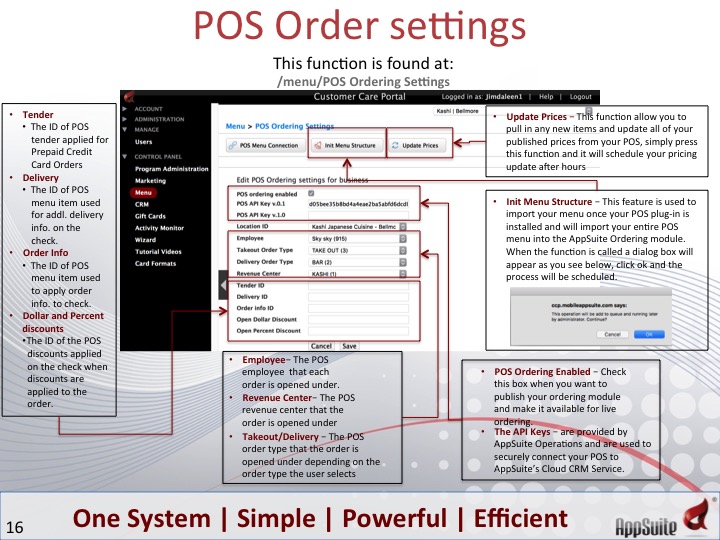
On your control panel on the left locate the "menu module". Once here you can select the "POS Ordering Settings" button to get to the below screen. On this screen you can configure all of the settings that control how the orders are entered into your POS system.
Step 3: Configure Notification Settings
Click Here to see how to configure notification settings. The areas that may want to configure for online ordering are:
- Takeout Order - Sends you a copy of every order that is placed
- Failed Order - Sends you a copy of an order if it fails to be sent to the POS
Step - 4: POS Printing Options.
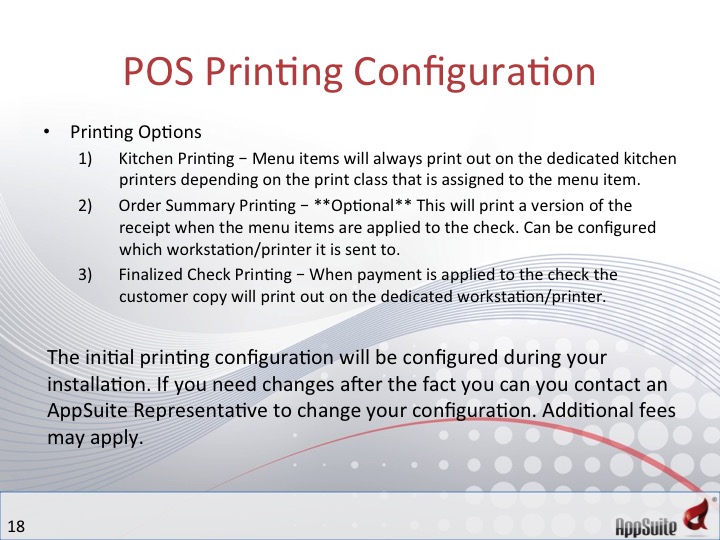
Some setting can be changed locally on your POS to change how/when/where the orders print out when submitted.
See next chapter: Menu Structure and Sync
Comments